image upload guide
Fit a Rectangular Image Into a Square Without Hiding the Tradeoff
Compare stretching, padding and cropping using the same original diagram, calculate the geometry, and choose what must be preserved.
Published October 9, 2026 by SOLVEOZA Editorial
Quick answer
A 400 × 300 image cannot both fill a 300 × 300 square and preserve all its content and proportions without added space. Stretching changes shapes, padding keeps the whole image, and cropping removes the sides.
Start with a delivery brief
Assume a destination requires exactly 300 × 300 pixels. Our original is a 400 × 300 diagram containing a circle and two edge markers. The brief must also say whether the whole source, undistorted shapes, or edge-to-edge coverage has priority.
The diagrams below are original vector geometry, not photographs or measured compression outputs. They isolate the geometry of fitting. The same tradeoff applies to raster content, but image quality and subject placement still require a separate visual check.
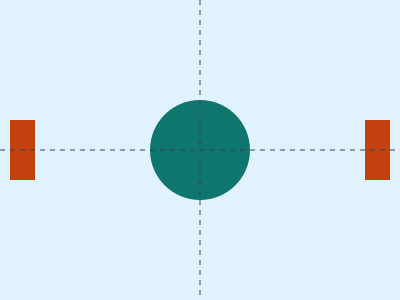
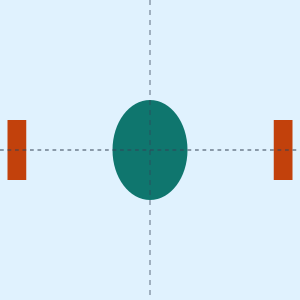
Stretch: fill the square by changing proportions
Resizing width from 400 to 300 uses a horizontal scale of 0.75, while keeping height at 300 uses a vertical scale of 1. The original 100-pixel-diameter circle becomes 75 pixels wide and 100 pixels tall. All source content remains, but its shape changes.
SOLVEOZA Image Resize accepts explicit width and height and draws into those dimensions. It does not infer that you wanted padding or a crop. Entering 300 and 300 for this source therefore illustrates the distortion problem rather than solving it automatically.
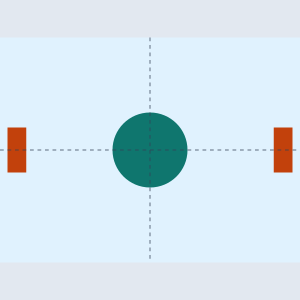
Contain with padding: preserve the whole source
Use the smaller target/source ratio: min(300/400, 300/300) = 0.75. The image becomes 300 × 225. Centering it in the square leaves 75 pixels of vertical space, or 37.5 above and below in continuous geometry.
A raster editor needs integer pixel placement. It may allocate 37 pixels on one side and 38 on the other. Choose an allowed background or transparency in that editor. Image Resize alone does not create the padded canvas; resizing to 300 × 225 is only the proportional intermediate step.
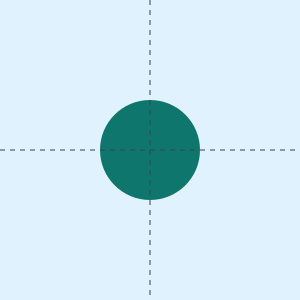
Cover with crop: fill the square without stretching
Use the larger ratio: max(300/400, 300/300) = 1. The source remains 400 × 300 and a centered 300 × 300 window removes 50 pixels from each side. That is 100 of 400 source columns, or 25% of the original area for this specific example.
The circle stays round but the edge markers disappear. In a real image, center cropping may cut off a subject or text. Move the crop window deliberately in an editor and inspect the result. SOLVEOZA's current resize tool does not provide a crop-position control.
Choose according to the content, then verify the file
For a chart whose labels must remain visible, padding is often compatible with preserving information if the destination allows it. For a photo whose subject fits inside a square crop, cropping may satisfy the brief. Stretching a diagram or product image changes its geometry and should be a conscious choice.
After editing, check actual file dimensions, edge content and any separate byte-size limit. A CSS preview can fit an image into a square without changing the downloaded file. The MDN object-fit reference describes display fitting, not a guarantee that an exported asset has the displayed dimensions.
| Method | All content | Proportions | Fills square |
|---|---|---|---|
| Stretch | Yes | No | Yes |
| Contain + padding | Yes | Yes | With added space |
| Cover + crop | No | Yes | Yes |
Methodology
- Use one 400 × 300 source with a 100-pixel circle and edge markers.
- Compare unequal scaling, minimum-ratio containment and maximum-ratio covering into 300 × 300.
- Inspect generated diagrams at equal square target dimensions.
Limitations
- Raster rounding can distribute an odd padding pixel asymmetrically.
- A destination may forbid padding, transparency or cropping; check its actual brief.
- These diagrams do not measure raster sharpness or compression.
Sources
Four original SVG diagrams illustrate exact geometry. No photograph, codec benchmark or external upload acceptance is claimed.
- Display fitting modes (accessed 2026-10-09)
FAQ
Can all three requirements be met without a tradeoff?
Not when source and target ratios differ, unless you allow extra space, removed content or altered proportions.
Does Image Resize automatically crop or pad?
No. It resizes to the dimensions you enter. Use an editor for crop positioning or a padded canvas.
Does a square web preview prove the file is square?
No. Display fitting can leave the source file dimensions unchanged.
Why are the padding halves 37.5 pixels?
The continuous geometry divides 75 remaining pixels equally. A raster placement may use 37 and 38 pixels.